SpringBoot怎么读取资源目录中JSON文件
思路
使用Spring的ResourceUtils读取资源目录下的json文件。
使用common-io将读取的文件转化为json字符串。
使用fastjson将json字符串反序列为对象。
示例
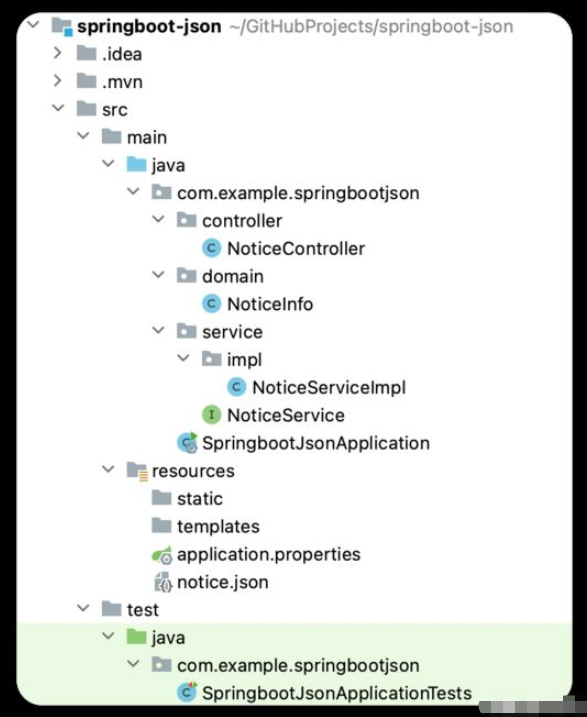
1.Maven依赖
pom.xml,主要是common-io、fastjson的引入。
            commons-io
            commons-io
            2.11.0


            com.alibaba.fastjson2
            fastjson2
            2.0.14
2.json资源文件
notice.json,简单列举要使用json内容。
[
  {
    "title": "新功能xxx上线",
    "content": "支持xxx"
  },
  {
    "title": "旧功能xxx下线",
    "content": "不支持xxx"
  }
]
3.读取json的Service
3.1.定义接口
package com.example.springbootjson.service;

import com.example.springbootjson.domain.NoticeInfo;

import java.io.IOException;
import java.util.List;

/**
 * @author hongcunlin
 */
public interface NoticeService {
    /**
     * 获取公告
     *
     * @return 公告
     * @throws IOException 文件
     */
    List getNoticeInfoList() throws IOException;
}
3.2.实现接口
这里可以说是本文的核心部分了,具体可以看代码中的实现,通过ResourceUtils读取notice.json这个json文件,通过common-io的FileUtils转化文件为json字符串,通过fastjson的JSON反序列json对象。
package com.example.springbootjson.service.impl;

import com.alibaba.fastjson2.JSON;
import com.example.springbootjson.domain.NoticeInfo;
import com.example.springbootjson.service.NoticeService;
import org.apache.commons.io.FileUtils;
import org.springframework.stereotype.Service;
import org.springframework.util.ResourceUtils;

import java.io.File;
import java.io.IOException;
import java.util.List;

/**
 * @author hongcunlin
 */
@Service
public class NoticeServiceImpl implements NoticeService {

    @Override
    public List getNoticeInfoList() throws IOException {
        File file = ResourceUtils.getFile("classpath:notice.json");
        String json = FileUtils.readFileToString(file, "UTF-8");
        List noticeInfoList = JSON.parseArray(json, NoticeInfo.class);
        return noticeInfoList;
    }
}
4.测试接口
编写一个简单的集成测试,将上述编写的Service注入,执行方法,打印执行结果。
package com.example.springbootjson;

import com.example.springbootjson.service.NoticeService;
import org.junit.jupiter.api.Test;
import org.springframework.boot.test.context.SpringBootTest;

import javax.annotation.Resource;
import java.io.IOException;

@SpringBootTest
class SpringbootJsonApplicationTests {
    @Resource
    private NoticeService noticeService;

    @Test
    void contextLoads() throws IOException {
        System.out.println(noticeService.getNoticeInfoList());
    }
}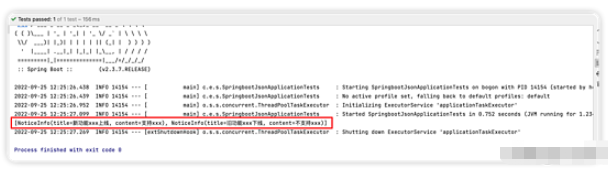
可以看到,可以正常地输出json文件中的内容,说明我们的程序是正确的。