VUE怎么使用canvas绘制管线管廊
首先,我在JS中定义了一下常量,其作用如下:
let canvas = {}, ctx = {};
const image = new Image();
// 定义管线默认宽度
const PIPELINE_NUMBER = 15;
// 定义图标默认缩放比例
const ICON_SCALE_RATIO = 25;
// 所有绘制元素
let allElementCollection = [];
// 初始化管线水类型: 0为冷水 1为热水
let pipeline_water_type = 0;
// 当前绘制设备的对象
let equipment_select = {};
// 是否显示设备绘制的范围
let equipment_area_show = false
// 初始化绘制类型:0为管线 1为设备,2为文字框 默认为管线
let draw_element_type = 0;
// 管线流动速度初始值
let pipeline_offset = 0;
// 定义当前选中的已绘制元素
let current_select_element_index = {};
接下来是处理鼠标左键在按下后,在上节的代码中,针对于鼠标左键按下后,需要判断当前点击的区域是否已经存在绘制的内容,如果有,执行绘制内容移动,如果没有,则开始新建绘制内容,代码如下:
if (shape) {
    moveAllElement(e, clickX, clickY, rect, shape);
    canvas.style.cursor= "move";
} else {
    if (e.buttons === 1) {
        draw_element_type === 0 ? drawRealTimePipeline(e, clickX, clickY, rect) : (draw_element_type === 1 ? drawRealTimeEquipment(e, clickX, clickY, rect) : drawRealTimeText(e, clickX, clickY, rect))
    }
}
我们一个一个的来,如果绘制内容不存在,则执行新建绘制内容,这里我使用三目运算来判断当前需要绘制的类型drawRealTimePipeline、drawRealTimeEquipment、drawRealTimeText。
drawRealTimePipeline:绘制实时管线
// 绘制实时管线
const drawRealTimePipeline = (e, clickX, clickY, rect) => {
    const shape = new ElementFactory(clickX, clickY);
    shape.endX = clickX;
    shape.endY = clickY;
    // 绘制管线时,删除通过 new 的对象的 textInfo 和 equipmentInfo,这两个对于管线来说没有用处
    delete shape.textInfo;
    delete shape.equipmentInfo;
    let shapeWidth = 0, shapeHeight = 0;
    // 为了方便处理元素删除,动态添加一个随机的 ID,并且在当前位置拿到,方便在绘制线段过短时来精确删除
    let current_uid = setuid(shape);
    allElementCollection.push(shape);
    window.onmousemove = (evt) => {
        ctx.clearRect(0, 0, canvas.width, canvas.height);
        shapeWidth = (evt.clientX - rect.left) - clickX;
        shapeHeight = (evt.clientY - rect.top) - clickY;
        // 判断绘制为 竖线 还是 横线
        let shapeDirection = Math.abs(shapeWidth) >= Math.abs(shapeHeight);
        if (shapeDirection) {
            // 如果是横线,则 endY 为固定值
            shape.endX = evt.clientX - rect.left;
            shape.endY = clickY + PIPELINE_NUMBER;
        } else {
            // 如果是竖线,则 endX 为固定值
            shape.endX = clickX + PIPELINE_NUMBER;
            shape.endY = evt.clientY - rect.top;
        }
        shape.pipelineInfo.direction = shapeDirection;
        shape.pipelineInfo.waterType = pipeline_water_type;
        draw();
    };
    // 画线时,鼠标抬起判断如果线段绘制过短,则不推入 allElementCollection
    window.onmouseup = () => {
        if(parseInt(draw_element_type) === 0 && shape.endX) {
            if (Math.abs(shape.startX - shape.endX) < 45 && Math.abs(shape.startY - shape.endY) < 45) {
                let index = allElementCollection.findIndex(item => item.uid === current_uid);
                allElementCollection.splice(index, 1)
                ctx.clearRect(0, 0, canvas.width, canvas.height)
                draw()
            }
        }
    };
}
const setuid = (shape) => {
    // 生成唯一ID
    let uid = Math.round( Math.random() * 100000000000);
    shape.uid = uid;
    return uid
}
drawRealTimeEquipment:绘制实时设备:
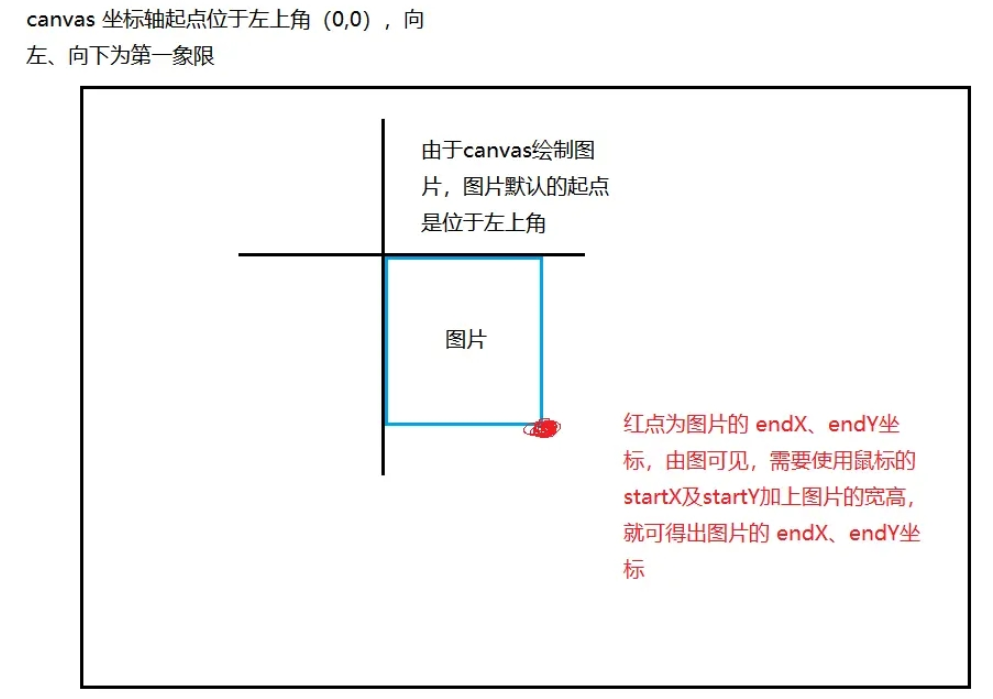
绘制设备时,由于绘制的图片,所以对于构造函数中的endX、endY需要自己计算
// 绘制实时设备
const drawRealTimeEquipment = (e, clickX, clickY, rect) => {
    const shape = new ElementFactory(clickX, clickY)
    // 绘制设备时,删除通过 new 的对象的 textInfo 和 pipelineInfo,这两个对于图形来说没有用处
    delete shape.textInfo;
    delete shape.pipelineInfo;
    // 设备绘制在鼠标点击的那一刻就需要开始创建,
    setEquipment(e);
    setuid(shape);
    allElementCollection.push(shape);
    window.onmousemove = (evt) => setEquipment(evt);
    function setEquipment(evt) {
        ctx.clearRect(0, 0, canvas.width, canvas.height);
        shape.startX = evt.clientX - rect.left;
        shape.startY = evt.clientY - rect.top;
        // 计算当前绘制的endX endY
        image.src = require(`../assets/images/${equipment_select.iconPath}`);
        let icon_width = Math.ceil(image.width / ICON_SCALE_RATIO),
            icon_height = Math.ceil(image.height / ICON_SCALE_RATIO);
        shape.endX = evt.clientX - rect.left + icon_width;
        shape.endY = evt.clientY - rect.top + icon_height;
        draw();
    }
    draw();
};
drawRealTimeText:绘制实时文本:
// 绘制实时文字
const drawRealTimeText = (e, clickX, clickY, rect) => {
    const shape = new ElementFactory(clickX, clickY);
    setuid(shape);
    // 绘制文字时,删除通过 new 的对象的 equipmentInfo 和 pipelineInfo,这两个对于图形来说没有用处
    delete shape.equipmentInfo;
    delete shape.pipelineInfo;
    ctx.font = `normal normal normal ${shape.textInfo.fontSize + 'px' || '16px'} Microsoft YaHei`;
    const defaultText = '默认文字,请右键修改';
    const measureText = ctx.measureText(defaultText);
    const textW = measureText.width,
        textH = measureText.actualBoundingBoxAscent + measureText.actualBoundingBoxDescent;
    shape.textInfo.text = defaultText;
    allElementCollection.push(shape);
    setText(e)
    window.onmousemove = (evt) => setText(evt)
    function setText(evt) {
        ctx.clearRect(0, 0, canvas.width, canvas.height)
        shape.startX = evt.clientX - rect.left;
        shape.startY = evt.clientY - rect.top;
        shape.endX = evt.clientX - rect.left + textW;
        shape.endY = evt.clientY - rect.top - textH;
        draw();
    }
    draw();
};
接下来是鼠标点的位置,已经存在了绘制的内容,那么这个时候就有两种情况了,一个是 鼠标左键 点击的,一个是 鼠标右键 点击的。
鼠标左键点击只能执行移动,鼠标右键则是弹出操作框,如图:
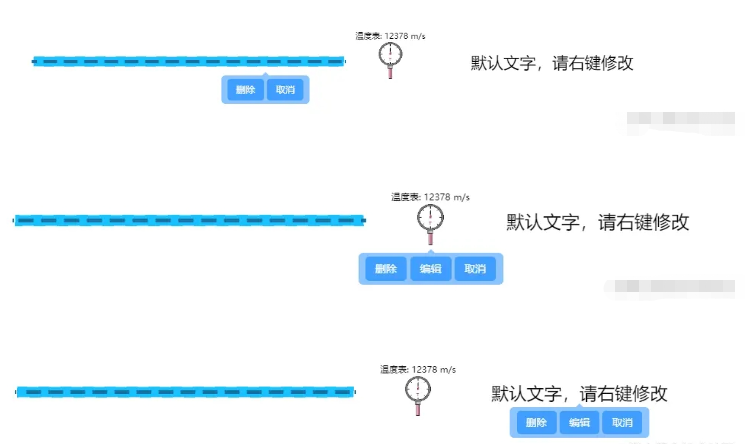
这里有一点需要注意,管线的操作框中没有 编辑 按钮,且弹出框的位置需要根据鼠标点击的位置变化而变化。
moveAllElement:元素移动事件:
// 元素移动
const moveAllElement = (e, clickX, clickY, rect, shape) => {
    const { startX, startY, endX, endY } = shape;
    let tipX = 0, tipY = 0;
    // 鼠标左键:拖动位置
    if (e.buttons === 1) {
        window.onmousemove = (evt) => {
            removeEditTip();
            ctx.clearRect(0, 0, canvas.width, canvas.height);
            const distanceX = evt.clientX - rect.left - clickX;
            const distanceY = evt.clientY - rect.top - clickY;
            shape.startX = startX + distanceX;
            shape.startY = startY + distanceY;
            shape.endX = endX + distanceX;
            shape.endY = endY + distanceY;
            draw();
        }
    }
    // 鼠标右键:执行信息编辑
    if (e.buttons === 2) {
        if (shape.type === 0) {
            // 管线
            tipX = e.clientX;
            tipY = e.clientY + 10;
        } else if (shape.type === 1) {
            // 如果点击的是图标,弹出提示出现在图标下方
            tipX = (shape.endX - shape.startX) / 2 + shape.startX + rect.left
            tipY = shape.endY + rect.top
        } else if (shape.type === 2) {
            // 文字
            tipX = shape.startX + rect.left + ctx.measureText(`${shape.textInfo.text}`).width / 2;
            tipY = shape.startY + rect.top;
        }
        createEditTip(tipX, tipY, shape);
        return false
    }
};createEditTip为动态创建的DOM结构,即操作提示框。
createEditTip、removeEditTip:动态创建及移除DOM操作提示框:
// 创建管线点击事件弹窗
const createEditTip = (x, y, shape) => {
    let width = shape.type ? 180 : 120, marginLeft = shape.type ? 95 : 65, display = shape.type ? 'inline-block' : 'none'
    removeEditTip()
    let tipText = document.createElement('div')
    tipText.classList.add('tip-text-content')
    tipText.innerHTML = `

                                删除
                                编辑
                                取消