验证码: 看不清楚,换一张 查询 注册会员,免验证
  • {{ basic.site_slogan }}
  • 打开微信扫一扫,
    您还可以在这里找到我们哟

    关注我们

怎么用Ant Design编写登录和注册页面

阅读:996 来源:乙速云 作者:代码code

怎么用Ant Design编写登录和注册页面

一、登录

1.index.tsx页面

代码如下(示例):

import { Form, Input, Button, Tabs, Row, Col } from 'antd';
import { Footer } from 'antd/lib/layout/layout';
import React from 'react';
import styles from './index.module.less';

const onFinish = (values: any) => {
  console.log('Received values of form: ', values);
};

const { TabPane } = Tabs;
function callback(key) {
  console.log(key);
}
export default function Login() {
  return (


        项目名称       
                                                                                                                                                                     创建账号                                                                  登录                                                                                                                                                                                                                                                                  发送验证码                                                                                   创建账号                                                                  登录                                                                                                           底部说明                        ) }

2.index.module.less

代码如下(示例):

.bg {
  height: 900px;
  background: linear-gradient(180deg, #a0d7e7, #6c5dd3);
  margin: auto;
  // padding: 200px;
  text-align: center;
  justify-content: center;
  display: flex;
  align-items: center;
}

.login_card {
  width: 520px;
  height: 450px;
  background: #f2f3f7;
  border-radius: 20px;
  margin: auto;
  text-align: center;
  justify-content: center;
  padding: 51px 60px;
}

.login-button {
  width: 400px;
  height: 56px;
  background: #6c5dd3;
  border-radius: 12px;
}

.heard {
  position: absolute;
  display: flex;
  top: 264px;
}
.title {
  width: 315px;
  font-size: 30px;
  font-family: Arial;
  font-weight: bold;
  color: #151830;
}
.cloud {
  width: 100px;
  height: 72px;
  line-height: 72px;
  background-image: url("../../../../public/img/cloud.png");
}
.cloud img {
  width: 40px;
  height: 40px;
}
.footer {
  width: 100%;
  height: 12px;
  font-size: 10px;
  font-family: Microsoft YaHei;
  font-weight: 300;
  color: #151830;
  background: none;
  bottom: 34px;
  left: 0;
  position: absolute;
}

二,注册

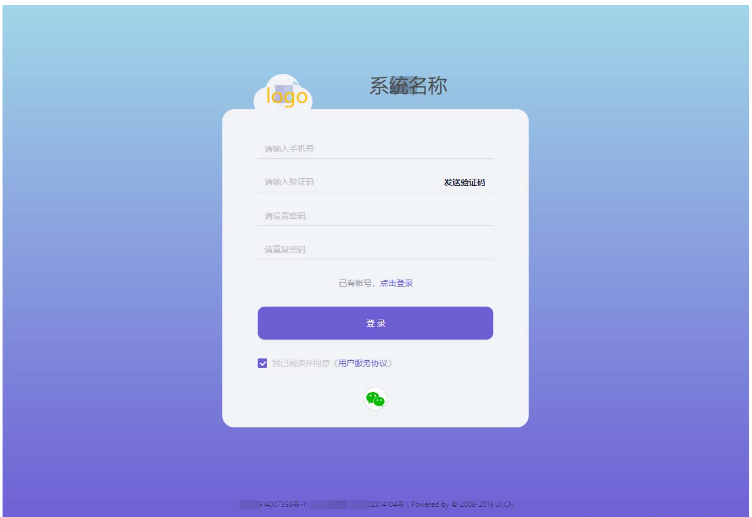
注册页面代码和样式,不多描述,直接看图

怎么用Ant Design编写登录和注册页面

1.index.tsx

代码如下(示例):

import React from 'react';
import { Form, Input, Button, Checkbox, Tabs, Row, Col } from 'antd';
import styles from './index.module.less';
import { Footer } from 'antd/lib/layout/layout';

const onFinish = (values: any) => {
  console.log('Received values of form: ', values);
};
export default function Register() {
  return (


        系统名称


                发送验证码


            已有帐号,点击登录


              登录


            我已阅读并同意《用户服务协议》


          底部说明


  );
}

2.index.module.less

代码如下(示例):

.bg {
  height: 900px;
  background: linear-gradient(180deg, #a0d7e7, #6c5dd3);
  margin: auto;
  padding: 150px;
  text-align: center;
  justify-content: center;
  display: flex;
  align-items: center;
}

.login_card {
  width: 520px;
  height: 540px;
  background: #f2f3f7;
  border-radius: 20px;
  margin: auto;
  text-align: center;
  justify-content: center;
  padding: 51px 60px;
}

.login-button {
  width: 400px;
  height: 56px;
  background: #6c5dd3;
  border-radius: 12px;
}
.heard {
  position: absolute;
  display: flex;
  top: 218px;
}
.title {
  width: 315px;
  font-size: 30px;
  font-family: Arial;
  font-weight: bold;
  color: #151830;
}
.cloud {
  width: 100px;
  height: 72px;
  line-height: 72px;
  background-image: url("../../../../public/img/cloud.png");
}
.cloud img {
  width: 40px;
  height: 40px;
}
.footer {
  width: 100%;
  height: 12px;
  font-size: 10px;
  font-family: Microsoft YaHei;
  font-weight: 300;
  color: #151830;
  background: none;
  bottom: 34px;
  left: 0;
  position: absolute;
}

总结

好像没啥重点,div垂直居中算个重点吧。

  justify-content: center;
  display: flex;
  align-items: center;
分享到:
*特别声明:以上内容来自于网络收集,著作权属原作者所有,如有侵权,请联系我们: hlamps#outlook.com (#换成@)。
相关文章
{{ v.title }}
{{ v.description||(cleanHtml(v.content)).substr(0,100)+'···' }}
你可能感兴趣
推荐阅读 更多>