vue如何控制滚动条滑到某个位置
阅读:1727
来源:乙速云
作者:代码code
vue如何控制滚动条滑到某个位置
一.关于web开发的各种高度的计算介绍
设置当前滑动到的距离
语法一:window.scrollTop(x,y) 传俩个值
//x横坐标 y纵坐标
例:window.scrollTop(0,1000)
语法二:window.scrollTop(options) 传对象,对象里面放属性
  window.scrollTo({
           top:560,
          left:0,
          behavior: "smooth"
        });
// top:纵坐标 left:横坐标
behavior 类型String,表示滚动行为,支持参数 smooth(平滑滚动),instant(瞬间滚动),默认值auto,实测效果等同于instant
    // 获取html元素
    let htmlDom = document.documentElement;
    // 获取页面高度加内边距
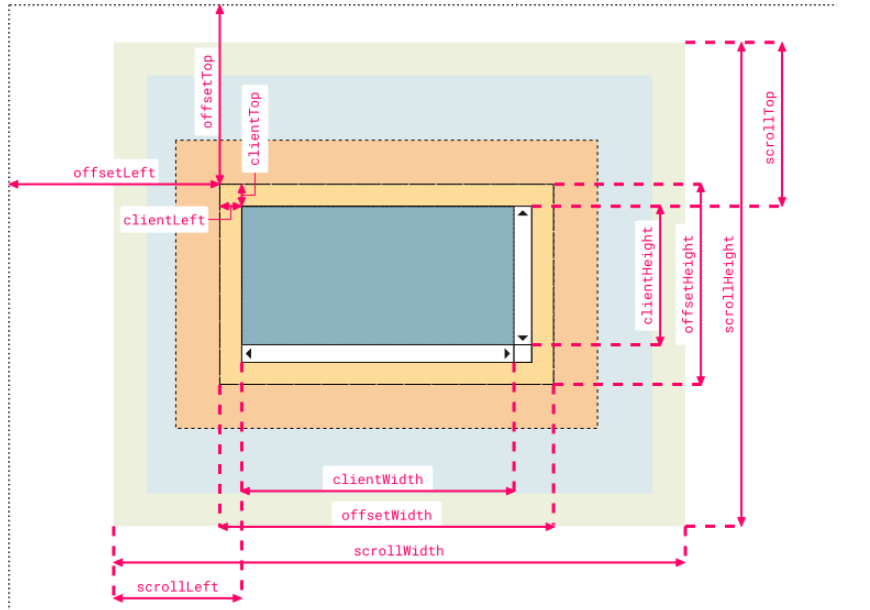
    const deviceHeight = htmlDom.clientHeight;
    //获取当前滚动条的高度
    const scrollHeight=htmlDom.scrollHeight;
    //获取页面高度加内边距加边框
    const offsetHeight=htmlDom.offsetHeight;
    console.log("html--------",htmlDom.offsetHeight);
    console.log("deviceHeight",deviceHeight);
    console.log("scrollHeight",htmlDom.scrollHeight);
    //我的业务里面只用到了这个scrollHeight
    let keepHeight=htmlDom.scrollHeight-90;
    // 如果需要设置某个元素的样式等用ref进行一个绑定 这个例子ref绑定的就是list
    // this.$refs.list.style.height = htmlDom.scrollHeight +"px"
    window.scrollTo({
      top: keepHeight,
      behavior: 'instant'
    })
配个官方图理解:
二.回到页面顶部实现方法
1. 元素中绑定ref
在需要回到顶部的地方加上此代码
   this.$nextTick(() => {
        this.$refs.returnTop.scrollTop = 0
      })
2. 浏览器回到页面顶部 window.scrollTo(0,0),页面滚动
不用多介绍了,上面有。
一个小例子如下:
window.scrollTo( 0, 100 );

// 设置滚动行为改为平滑的滚动
window.scrollTo({
    top: 1000,
    behavior: "smooth"
});
3.使用el-pagination实现翻页自动回到顶部
定义$scrollTo方法挂载在vue全局
// main.js
Vue.prototype.$scrollTo = (x = 0, y = 0, type = 'smooth') => {
    window.scrollTo({
        top: x,
        left: y,
        behavior: type // 滚动行为:smooth平滑滚动,instant瞬间滚动,默认值auto,等同于instant
    })
}
// 使用方法
this.$scrollTo()
三.总计一下今天学到的新知识
(1)watch监听属性变化函数
监听属性的两种写法:
isHot:{
	// immediate:true, //初始化时让handler调用一下
	//handler什么时候调用?当isHot发生改变时。
    //deep:true, //开启深度监视,当属性是个对象时,如需监听对象的属性,需开启深度监视
	  handler(newValue,oldValue){
	console.log('isHot被修改了',newValue,oldValue)
	}
},

//简写
/* isHot(newValue,oldValue){
	console.log('isHot被修改了',newValue,oldValue,this)
} */
watch监听函数实现compted函数相同功能
			data:{
				firstName:'张',
				lastName:'三',
				fullName:'张-三'
			},
			watch:{
				firstName(val){
                   //监听函数可以实现异步方法
					setTimeout(()=>{
						console.log(this)
						this.fullName = val + '-' + this.lastName
					},1000);
				},
				lastName(val){
					this.fullName = this.firstName + '-' + val
				}
			}
(2)computed和watch之间的区别:
1.computed能完成的功能,watch都可以完成。
2.watch能完成的功能,computed不一定能完成,例如:watch可以进行异步操作。
但是computed进行计算某些值得时候,可以少写一个属性。例如:fullName
补充:vue平滑滚动到指定位置
需求:锚点导航问题,点击导航跳到对应的模块,两种方式
1.滚动盒子滚动到指定高度 scrollTo(offsetTop每个模块顶部距离可滚动盒子的顶部偏移的像素值)
    goAnthor (selector) {
      const height = document.querySelector(selector).offsetTop
      const container = document.querySelector('.scroll-wrap')
      container.scrollTo({
        top: height,
        behavior: 'smooth'
      })
    },
2.滚动元素滚动到滚动盒子的最顶部 scrollIntoView
    goAnthor(selector) {
      document.querySelector(selector).scrollIntoView({
        behavior: 'smooth'
      })
    },
分享到:
*特别声明:以上内容来自于网络收集,著作权属原作者所有,如有侵权,请联系我们: hlamps#outlook.com (#换成@)。