怎么获取微信用户openid
1、前言
首先我们要进行相关的开发的话,那么我们需要先获取微信的openid。那么我们英爱怎样获取呢?这里我会介绍两种方式。
2、手工方式
官方文档
2.1、设置域名
(1).注册对应的公众号找到下图位置
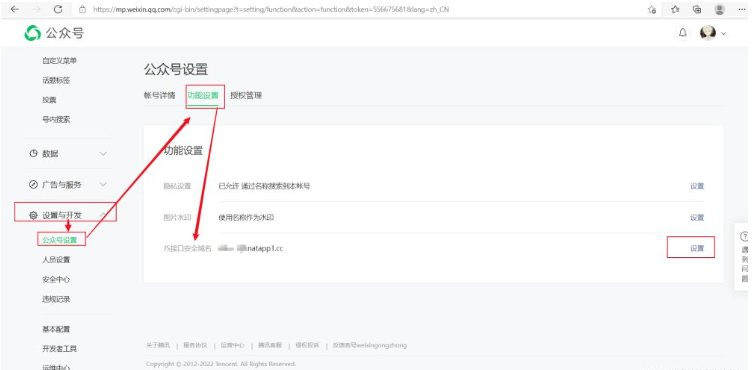
(2). 在natapp.cn上购买自己的用于微信开发的域名
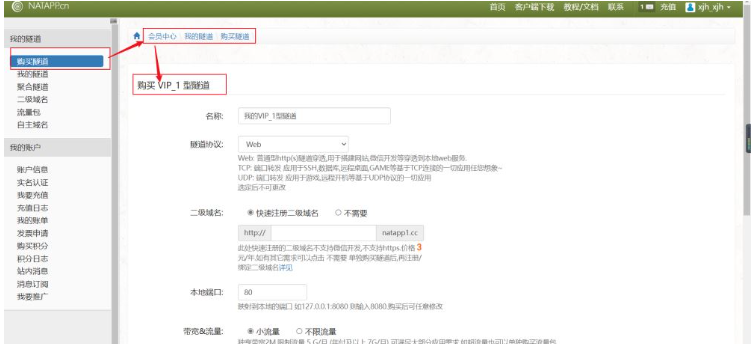
哈哈,这个网站上面的域名也不是特别的贵呀,我在这上面买的一个域名为期一个月的话也就才12元,且改类型的属于二级域名,是已经备过案的,所以也就不需要备案。
(3). 下载对应的客户端进行启动

在windows上启动的命令
natapp -authtoken 你的authtoken
启动后
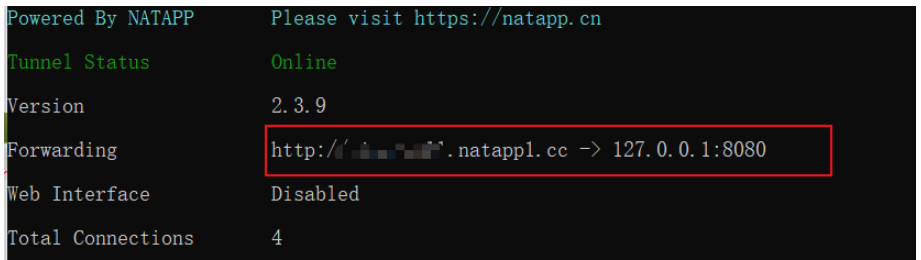
可见我的域名指向了127.0.0.1:8080。
(4).将我们的域名填到公众号中JS接口安全域名提交

提交之前我们需要将上图中的红色框框住的部分的文件下载下来放置项目的
static目录下,测试访问通过之后,然后才能进行提交。
2.2、获取code
可谓是一波三折呀,我本来以为我这个项目就要gg了。但也是我自己太小儿科了。微信怎么可能没有想到这么一个问题呢。就是微信公众号的 网页授权获取用户基本信息 功能服务。它这个功能服务必须只有 服务号 才拥有,但是其实每个用户可以免注册获得一个测试号,该测试号就含有这个特殊功能服务。
(1).登录自己的测试号
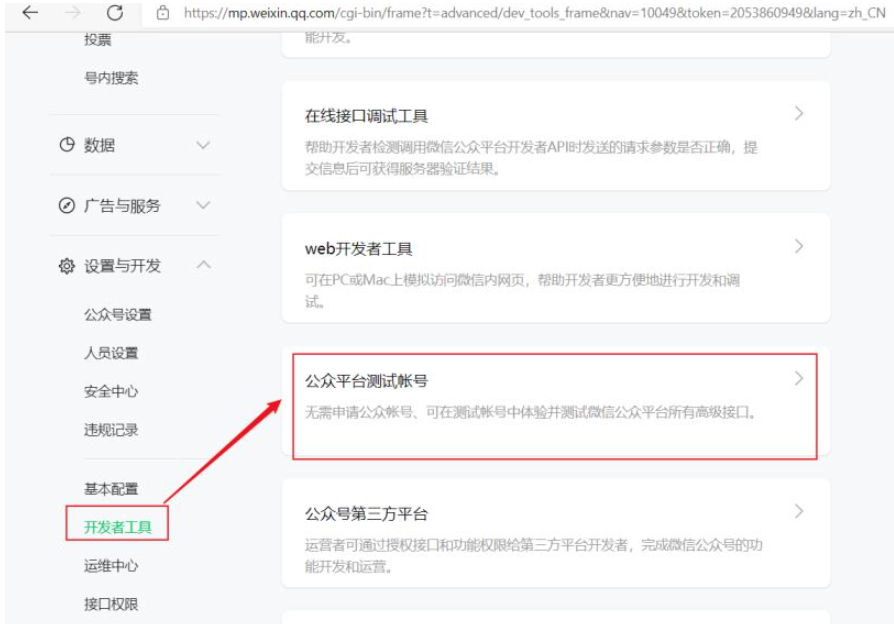
微信测试号是免注册的,我们直接扫码登录即可。
(2).编写对应的接口
import lombok.extern.slf4j.Slf4j;
import org.springframework.web.bind.annotation.GetMapping;
import org.springframework.web.bind.annotation.RequestMapping;
import org.springframework.web.bind.annotation.RequestParam;
import org.springframework.web.bind.annotation.RestController;

/**
 * @author :小肖
 * @date :Created in 2022/2/1 21:55
 */
@RestController
@RequestMapping("/weixin")
@Slf4j
public class WeixinController {

    @GetMapping("/auth")
    public void auth(@RequestParam("code") String code){
        log.info("进入了auth方法...");
        log.info("code = {}",code);
    }
}
(3).在登录测试号之后进行网页授权
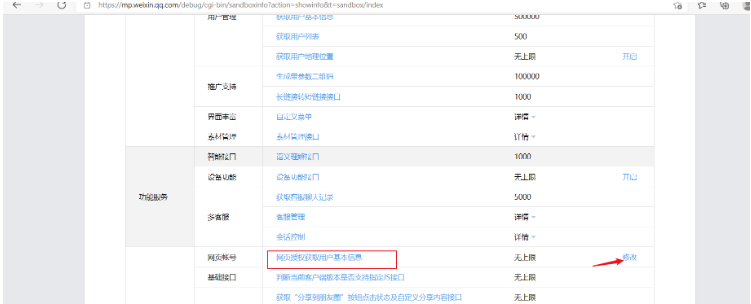
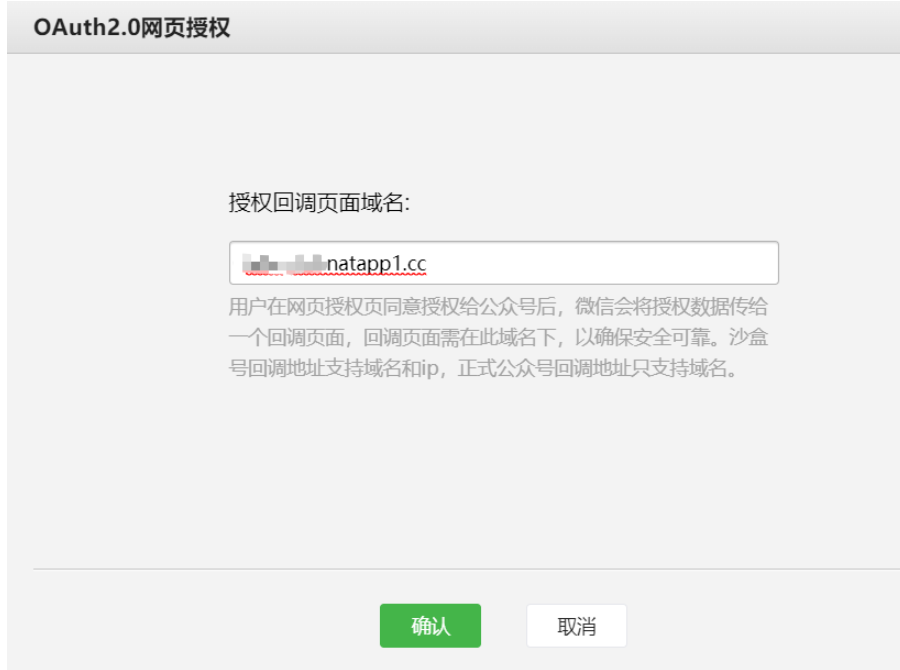
授权的域名就是我们在
natapp.cn上购买的域名,如果没有进行授权的话那么就会报出10003 redirect_uri域名与后台配置不一致错误。
(4).进行访问url进行测试
https://open.weixin.qq.com/connect/oauth3/authorize?appid=测试号的appid&redirect_uri=http://你的域名/sell/weixin/auth&response_type=code&scope=snsapi_base&state=STATE#wechat_redirect
注意点
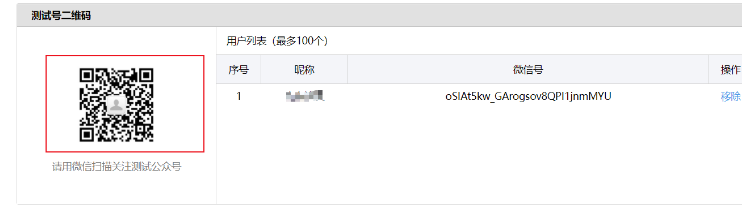
被测试的对象必须先关注对应的测试号且必须在微信客户端进行访问。
(5).测试结果

成功获取了用户的code信息。
2.3、换取access_token
(1).编写的controller
import lombok.extern.slf4j.Slf4j;
import org.springframework.web.bind.annotation.GetMapping;
import org.springframework.web.bind.annotation.RequestMapping;
import org.springframework.web.bind.annotation.RequestParam;
import org.springframework.web.bind.annotation.RestController;
import org.springframework.web.client.RestTemplate;

/**
 * @author :小肖
 * @date :Created in 2022/2/1 21:55
 */
@RestController
@RequestMapping("/weixin")
@Slf4j
public class WeixinController {

    @GetMapping("/auth")
    public void auth(@RequestParam("code") String code){
        log.info("进入了auth方法...");
        log.info("code = {}",code);
        String url = "https://api.weixin.qq.com/sns/oauth3/access_token?appid=appid&secret=appsecret&code=" + code + "&grant_type=authorization_code";
        RestTemplate restTemplate = new RestTemplate();
        String response = restTemplate.getForObject(url, String.class);
    }
}
(2).访问的url组成
https://api.weixin.qq.com/sns/oauth3/access_token?appid=APPID&secret=SECRET&code=CODE&grant_type=authorization_code
| 参数 | 是否必须 | 说明 |
|---|---|---|
| appid | 是 | 公众号的唯一标识 |
| secret | 是 | 公众号的appsecret |
| code | 是 | 填写第一步获取的code参数 |
| grant_type | 是 | 填写为authorization_code |
(3).访问的结果
{
  "access_token": "53_HK355v2MhOolNlGkaoUf4oDCkyX0WDollvsQNU5SvhsvmvF2S2VoqdPXuokfERI2oqFvQijVShq8aQzeQ9n01mGKSJn7q5rLAcYbTjm1H7k",
  "expires_in": 7200,
  "refresh_token": "53_C1us_G770mgzXjd-PuK329qB65lXiK483_qxUXjKudwWIdHkOz5ntwlByEgUQfMEy_-7tCCzcO4DoHaFbY0JurpZYD3Bys6DLs8ua8J_CjU",
  "openid": "你的openid",
  "scope": "snsapi_base"
}
3、使用第三方sdk
3.1、引入第三方依赖
            com.github.binarywang
            weixin-java-mp
            3.1.0
3.2、将微信公众号配置写入yaml文件并引入类中
wechat:
  mpAppId: 你的微信测试号appId
  mpAppSecret: 你的微信测试号secret
import lombok.Data;
import org.springframework.boot.context.properties.ConfigurationProperties;
import org.springframework.stereotype.Component;

/**
 * @author :小肖
 * @date :Created in 2022/2/2 10:31
 */
@Component
@Data
@ConfigurationProperties(prefix = "wechat")
public class WechatAccountConfig {

    /**
     * 公众号id
     */
    private String mpAppId;

    /**
     * 公众号密钥
     */
    private String mpAppSecret;

}
3.3、编写配置类初始化设置wxMpService配置
import me.chanjar.weixin.mp.api.WxMpConfigStorage;
import me.chanjar.weixin.mp.api.WxMpInMemoryConfigStorage;
import me.chanjar.weixin.mp.api.WxMpService;
import me.chanjar.weixin.mp.api.impl.WxMpServiceImpl;
import org.springframework.beans.factory.annotation.Autowired;
import org.springframework.context.annotation.Bean;
import org.springframework.stereotype.Component;

/**
 * @author :小肖
 * @date :Created in 2022/2/2 10:24
 */
@Component
public class WechatMpConfig {


    @Autowired
    private WechatAccountConfig wechatAccountConfig;

    @Autowired
    private WxMpInMemoryConfigStorage wxMpInMemoryConfigStorage;

    @Bean
    public WxMpService wxMpService(){
        WxMpService wxMpService = new WxMpServiceImpl();
        wxMpService.setWxMpConfigStorage(wxMpInMemoryConfigStorage);
        return wxMpService;
    }

    @Bean
    public WxMpInMemoryConfigStorage wxMpConfigStorage(){
        /**
         * 这里需要注意的是 由于父类中没有定义对应的接口
         * 所以所有的方法都在其实现类中,所以我们要构造实现类
         */
        WxMpInMemoryConfigStorage wxMpConfigStorage = new WxMpInMemoryConfigStorage();
        wxMpConfigStorage.setAppId(wechatAccountConfig.getMpAppId());
        wxMpConfigStorage.setSecret(wechatAccountConfig.getMpAppSecret());
        return wxMpConfigStorage;
    }
}
3.4、编写对应的controller
import com.xiao.enums.ResultEnum;
import com.xiao.exception.SellException;
import lombok.extern.slf4j.Slf4j;
import me.chanjar.weixin.common.api.WxConsts;
import me.chanjar.weixin.common.error.WxErrorException;
import me.chanjar.weixin.mp.api.WxMpService;
import me.chanjar.weixin.mp.bean.result.WxMpOAuth3AccessToken;
import org.springframework.beans.factory.annotation.Autowired;
import org.springframework.stereotype.Controller;
import org.springframework.web.bind.annotation.GetMapping;
import org.springframework.web.bind.annotation.RequestMapping;
import org.springframework.web.bind.annotation.RequestParam;
import org.springframework.web.bind.annotation.RestController;

/**
 * @author :小肖
 * @date :Created in 2022/2/2 10:20
 */
@Controller
@RequestMapping("/wechat")
@Slf4j
public class WechatController {

    @Autowired
    private WxMpService wxMpService;

    @GetMapping("/authorize")
    public String authorize(@RequestParam("returnUrl") String returnUrl){
        String url = "http://xiao-sell.natapp1.cc/sell/wechat/userInfo";
        String redirectUrl = wxMpService.oauth3buildAuthorizationUrl(url, WxConsts.OAuth3Scope.SNSAPI_USERINFO,returnUrl);
        return "redirect:" +  redirectUrl;
    }

    @GetMapping("/userInfo")
    public String userInfo(@RequestParam("code") String code,
                         @RequestParam("state") String returnUrl) {
        WxMpOAuth3AccessToken wxMpOAuth3AccessToken = new WxMpOAuth3AccessToken();
        try{
            wxMpOAuth3AccessToken = wxMpService.oauth3getAccessToken(code);
        }catch (WxErrorException e){
            log.error("【微信网页授权错误】 exception = {}",e);
            throw new SellException(ResultEnum.WECHAT_MP_ERROR.getCode(),e.getError().getErrorMsg());
        }
        String openId = wxMpOAuth3AccessToken.getOpenId();
        log.info("openid = {}",openId);
        return "redirect:" + returnUrl + "?openid=" + openId;
    }
}
3.5、进行debug测试
第一个断点
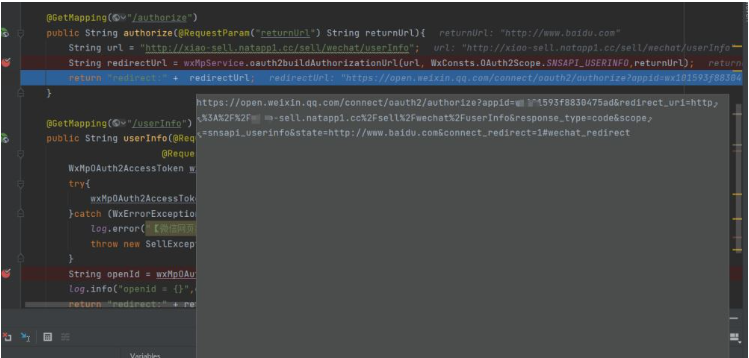
该重定向的url很明显就是我们手工方式中获取code的url。
第二个断点
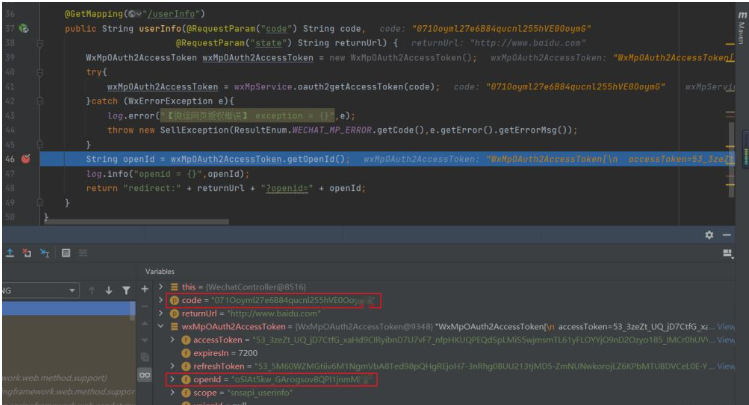
成功获取了code和openid。