pip安装opencv-python遇到的问题怎么解决
pip安装opencv-python遇到的问题
1.控制台出现这种情况就是版本过低,需要先升级版本,命令pip install -upgrade pip
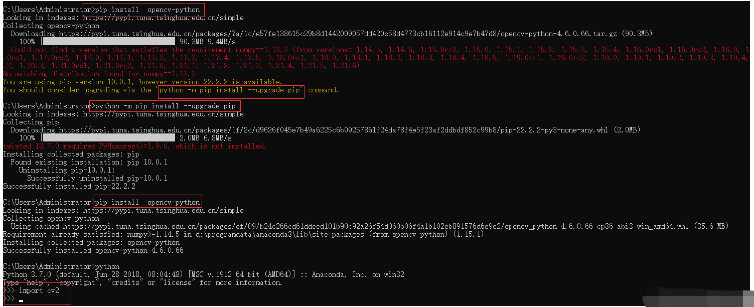
2. 出现:Script file ‘D:PythonAnaconda3Scriptspip-script.py’ is not present 原因就是升级pip过程中删除了原对应的文件 缺少升级后的pip及对应目录下的pip-script的python文件,缺少什么我们就加什么文件就解决问题了。cd命令切换到Scripts文件,使用命令conda install pip
3. 重新用pip install opencv-python 使用pip list检查安装是否成功
树莓派 pip安装opencv-python的正确实践
python -m pip install opencv-python -i http://pypi.douban.com/simple/ --trusted-host pypi.douban.com

"""许多教程里的代码都是用的老版本,函数API的接口有时不一样,如果不指定版本的话会安装最新版本,代码得大#幅修改,给入门增加阻力。
#安装指定版本: pip install opencv-python==3.4.3.18
记录备查
"""
完整安装过程如下
以后大家参考
pi@raspberrypi:~ $ python -m pip install opencv-python -i http://pypi.douban.com/simple/ --trusted-host pypi.douban.com
Looking in indexes: http://pypi.douban.com/simple/, https://www.piwheels.org/simple
Collecting opencv-python
  Downloading http://pypi.doubanio.com/packages/a1/d6/8422797e35f8814b1d9842530566a949d9b5850a466321a6c1d5a99055ee/opencv-python-4.3.0.38.tar.gz (88.0MB)
    100% |████████████████████████████████| 88.0MB 1.3MB/s
  Installing build dependencies ... error
  Complete output from command /usr/bin/python -m pip install --ignore-installed --no-user --prefix /tmp/pip-build-env-L6WFRh --no-warn-script-location --no-binary :none: --only-binary :none: -i http://pypi.douban.com/simple/ --extra-index-url https://www.piwheels.org/simple --trusted-host pypi.douban.com -- setuptools wheel scikit-build cmake pip "numpy==1.11.3; python_version=='3.5'" "numpy==1.13.3; python_version=='3.6'" "numpy==1.14.5; python_version=='3.7'" "numpy==1.17.3; python_version>='3.8'":
  Ignoring numpy: markers 'python_version == "3.5"' don't match your environment
  Ignoring numpy: markers 'python_version == "3.6"' don't match your environment
  Ignoring numpy: markers 'python_version == "3.7"' don't match your environment
  Ignoring numpy: markers 'python_version >= "3.8"' don't match your environment
  Looking in indexes: http://pypi.douban.com/simple/, https://www.piwheels.org/simple, https://www.piwheels.org/simple
  Collecting setuptools
    Downloading http://pypi.doubanio.com/packages/e1/b7/182161210a13158cd3ccc41ee19aadef54496b74f2817cc147006ec932b4/setuptools-44.1.1-py2.py3-none-any.whl (583kB)
  Collecting wheel
    Downloading http://pypi.doubanio.com/packages/a7/00/3df031b3ecd5444d572141321537080b40c1c25e1caa3d86cdd12e5e919c/wheel-0.35.1-py2.py3-none-any.whl
  Collecting scikit-build
    Downloading http://pypi.doubanio.com/packages/78/c9/7c2c7397ea64e36ebb292446896edcdecbb8c1aa6b9a1a32f6f67984c3df/scikit_build-0.11.1-py2.py3-none-any.whl (72kB)
  Collecting cmake
    Downloading http://pypi.doubanio.com/packages/eb/0a/039d5e4c4e2cf347091fe0e3ee322413e3750a5d4bd1d4b6d8537072687a/cmake-3.18.2.post1.tar.gz
      Complete output from command python setup.py egg_info:
      Traceback (most recent call last):
        File "", line 1, in
        File "/tmp/pip-install-S8P7fC/cmake/setup.py", line 7, in
          from skbuild import setup
      ImportError: No module named skbuild

      ----------------------------------------
  Command "python setup.py egg_info" failed with error code 1 in /tmp/pip-install-S8P7fC/cmake/

  ----------------------------------------
Command "/usr/bin/python -m pip install --ignore-installed --no-user --prefix /tmp/pip-build-env-L6WFRh --no-warn-script-location --no-binary :none: --only-binary :none: -i http://pypi.douban.com/simple/ --extra-index-url https://www.piwheels.org/simple --trusted-host pypi.douban.com -- setuptools wheel scikit-build cmake pip "numpy==1.11.3; python_version=='3.5'" "numpy==1.13.3; python_version=='3.6'" "numpy==1.14.5; python_version=='3.7'" "numpy==1.17.3; python_version>='3.8'"" failed with error code 1 in None
pi@raspberrypi:~ $ import cv2 as cv
bash: import:未找到命令
pi@raspberrypi:~ $ python
Python 2.7.16 (default, Oct 10 2019, 22:02:15)
[GCC 8.3.0] on linux2
Type "help", "copyright", "credits" or "license" for more information.
>>> import cv2 as cv
>>> print(cv.__version__)
3.2.0
>>>