怎么使用Java+EasyExcel实现文件上传功能
需求描述
页面中当用户将excel表格上传到服务器后,将该excel文件保存在本地然后在服务器中将excel中的数据读取出来然后存入数据库
实现
0、依赖
    com.alibaba
    easyexcel
    3.1.4


    com.alibaba
    fastjson
    1.2.75


    cn.hutool
    hutool-all
    5.8.11
1、编写配置类
文件上传的路径:用户传来的文件存放在哪
  # 文件上传
spring:
  servlet:
    multipart:
      max-file-size: 5MB
      max-request-size: 50MB

## 文件上传路径
savepath: C:Users86186Desktoppp
2、文件上传工具类
文件上传时需要使用到的一些方法
/**
 * 文件上传的工具类
 */
public class FileUploadUtil {
    /**
     * 得到filename文件名的后缀名
     * @param filename  文件名
     *                 aasdsad.jpg asaa.gif
     * @return
     */
    public static String getFileSuffix(String filename){
        if(filename == null || filename.isEmpty()){
            throw new RuntimeException("文件名不能为空,filename:"+filename);
        }
        return filename.substring(filename.lastIndexOf("."));
    }

    /**
     * 使用UUID生成一个唯一的字符串
     * @return
     */
    public static String randomFilename(){
        return UUID.randomUUID().toString().replaceAll("-","");
    }

    /**
     * 基于时间戳生成文件名
     * @return
     */
    public static String randomFilename2(){
        return System.currentTimeMillis()+"";
    }
    /**
     * 基于时间戳 + UUID生成文件名
     * @return
     */
    public static String randomFilename3(){
        return System.currentTimeMillis()+randomFilename();
    }


    /**
     * 创建目录
     */
    public static void mkdir(String path){
        File file = new  File(path);
        if(!file.exists()){ //不存在
            file.mkdirs();
        }
    }

    /**
     * 基于当前时间创建文件名
     */
    public static String getTimeFilename(){
        SimpleDateFormat simpleDateFormat = new SimpleDateFormat("yyy-MM-dd-HH-mm-ss");
        Date date = new Date(System.currentTimeMillis());
        return simpleDateFormat.format(date)+"-"+randomFilename2();
    }
}
3、编写Controller
需要接受前端返回回来的文件
/**
    * excel文件导入进数据库中
    * @param file
    * @return
    */
   @Autowired
   private FileUploadService fileUploadService;

   @PostMapping("excelImport")
   public ResponseData excelImport(MultipartFile file) throws Exception {
   		// 由于easyExcel所以需要传入fileUploadService对象
       String upload = fileUploadService.upload(file,fileUploadService);
       return ResponseDataUtil.buildOk(upload);
   }
4、编写Service
@Service("fileUploadService")
@Slf4j
public class FileUploadServiceImpl implements FileUploadService {
	// 注入environment来获取在配置文件中文件保存的路径
    @Autowired
    private Environment environment;
    // 注入数据层的对象
    @Autowired
    private productMapper productMapper;

    @Override
    public String upload(MultipartFile file, FileUploadService fileUploadService) throws Exception {
        if (file == null) {
            throw new Exception("文件不可以为空");
        }
        //得到上传的保存路径
        String savePath = environment.getProperty("savepath");
        //创建目录
        FileUploadUtil.mkdir(savePath);
        String dbPath = "";

        //得到上传的原文件名
        String originalFilename = file.getOriginalFilename();
        String suffix = FileUploadUtil.getFileSuffix(originalFilename);
        String filename = FileUploadUtil.getTimeFilename() + suffix;
        dbPath += filename;
        //保存
        file.transferTo(new File(savePath, filename));
        dbPath = savePath +"\"+ dbPath;

        //调用方法进行读取
        EasyExcel.read(dbPath, ExcelDTO.class, new PageReadListener(dataList -> {
            for (ExcelDTO demoData : dataList) {
                log.info("读取到一条数据{}", JSON.toJSONString(demoData));
                insert(demoData);
            }
        })).sheet().doRead();

        return dbPath;
    }

	// 插入数据到数据库中
    @Override
    public void insert(ExcelDTO excelDTO) {
    	// 使用hutool工具类将excelDTO类转换成product类,因为product类对应的是数据库中的字段
        Product product = BeanUtil.copyProperties(excelDTO, Product.class);
        productMapper.insert(product);
    }

}
5、编写excel对应的类
@Data
public class ExcelDTO {
   @ExcelProperty("药品名称")
   private String pname;
   @ExcelProperty("药品价格")
   private BigDecimal pprice;
   @ExcelProperty("药品数量")
   private String pcount;
   @ExcelProperty("药品描述")
   private String pdes;
   @ExcelProperty("药品类别")
   private Integer ptype;
}
6、创建easyExcel的监听器
ExcelDTO = excel对应的类
fileUploadService = service对象
@Slf4j @Component public class DataListener extends AnalysisEventListener{ public FileUploadService fileUploadService; public DataListener(FileUploadService fileUploadService) { this.fileUploadService = fileUploadService; } public DataListener() { } //读取excel内容,一行一行读取 @Override public void invoke(ExcelDTO excelDTO, AnalysisContext analysisContext) { if (excelDTO == null) { try { throw new Exception("文件数据为空"); } catch (Exception e) { e.printStackTrace(); } } } @Override public void doAfterAllAnalysed(AnalysisContext analysisContext) { } }
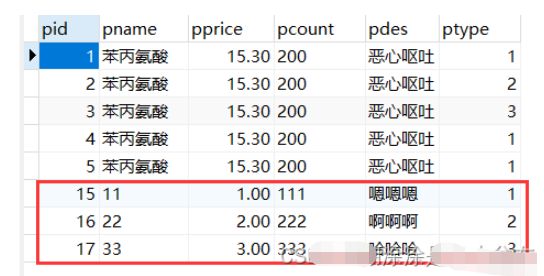
7、最终效果