arco design按需导入报错如何解决
记录一档使用arco-design按需加载的问题,来帮助更多的开发者避免。当前项目我使用的 @arco-design/web-vue 与 vite-plugin-style-import 版本是:
 "@arco-design/web-vue": "^2.43.2",
 "vite-plugin-style-import": "^2.0.0"
问题描述
首先根据 arco-design 官方的示例,我使用 vite-plugin-style-import 插件来自动加载组件样式,代码如下:
import { defineConfig } from "vite";
import vue from "@vitejs/plugin-vue";
import { createStyleImportPlugin } from "vite-plugin-style-import";
export default defineConfig({
  server:{
    host:"0.0.0.0",
  },
  plugins: [
    vue(),
    createStyleImportPlugin({
      libs: [
        {
          libraryName: "@arco-design/web-vue",
          esModule: true,
          resolveStyle: (name) => {
            // less
            return `@arco-design/web-vue/es/${name}/style/index.js`;
          },
        },
      ],
    }),
  ],
});
正常使用 Inpuit Button 组件的时候是没有问题的可以正常渲染,但是当我使用组 InputSearch InputPassword ImagePreview FormItem... 等类似于一些驼峰命名的组件(注意:不包含所有驼峰名的组件),在vite项目中会报一个样式引入的错误如下:
Failed to resolve import "/mnt/d/projectSpace/self-test/node_modules/@arco-design/web-vue/es/form-item/style/index.js" from "src/App.vue". Does the file exist?

排查问题
可以看到我们在 vite.config.js 配置文件中 resolveStyle 方法中返回了一个样式文件的路径,可以打印出来看一下这个 name 是什么。
   createStyleImportPlugin({
      libs: [
        {
          libraryName: "@arco-design/web-vue",
          esModule: true,
          resolveStyle: (name) => {
            console.log("resolveStyle===>",name)
            // less
            return `@arco-design/web-vue/es/${name}/style/index.js`;
          },
        },
      ],
    }),
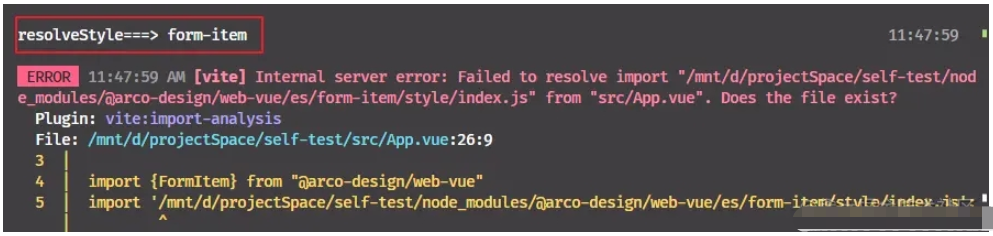
这么一看也没有什么问题,我使用组件的名字就是 FormItem 访问的也是 form-item,那再去 @arco-design 包里面查询一下对应的路径是否有文件
路径 @arco-design/web-vue/es/form-item/style/index.js
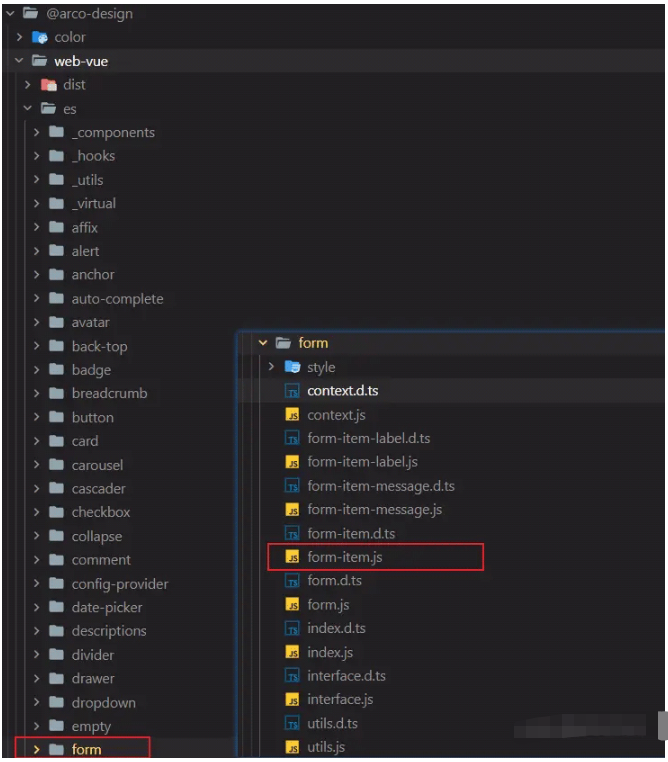
匪夷所思的一幕看到了在 /@arco-design/web-vue/es 目录下并没有 form-item 文件夹,还有前面我们遇到所有的报错的组件如 InputSearch InputPassword ImagePreview FormItem 也都是没有对应的文件夹,所以才导致他找不到这个组件的样式文件,但是通过上图可以看到我们导入的 FormItem 组件是从 form 文件夹中导出的,所以我们只需要 @arco-design/web-vue/es/form-item/style/index.js 改成 @arco-design/web-vue/es/form/style/index.js 导出就好了。
解决问题
问题原因找到了那处理起来就方便了, 我们可以写一个方法来修改这个组件的名称获取对应的路径。
处理思路
拿到
resolveStyle()回调中的name通过他生成一个路径使用
existsSync判断对应的路径文件是否存在,他返回一个boolean,存在返回true反之false文件路径如果不存在就把原路径
-结尾的名称去除,如原路径是input-search转成input, 如果有三级依此类推,一步一步的去找。最终返回正确的路径,如果没有就直接返回
""字符串
最终代码如下:
import { existsSync } from "node:fs";
import { join } from "node:path";
import { defineConfig } from "vite";
import vue from "@vitejs/plugin-vue";
import { createStyleImportPlugin } from "vite-plugin-style-import";
// 获取arco样式路径
function getArcoStylePath(name) {
  const names = name.split("-");
  const path = `@arco-design/web-vue/es/${name}/style/index.js`;
  if (existsSync(join(__dirname, "./node_modules/" + path))) {
    return path;
  } else {
    names.pop()
    return getArcoStylePath(names.join("-")) || ""
  }
}
export default defineConfig({
  server: {
    host: "0.0.0.0",
  },
  plugins: [
    vue(),
    createStyleImportPlugin({
      libs: [
        {
          libraryName: "@arco-design/web-vue",
          esModule: true,
          resolveStyle: (name) => {
            // less
            return getArcoStylePath(name);;
          },
        },
      ],
    }),
  ],
});