SpringBoot怎么整合SQLite数据库
前言
SQLite是一个进程内的库,实现了自给自足的、无服务器的、零配置的、事务性的 SQL 数据库引擎。它是一个零配置的数据库,这意味着与其他数据库不一样,您不需要在系统中配置。
就像其他数据库,SQLite 引擎不是一个独立的进程,可以按应用程序需求进行静态或动态连接。SQLite 直接访问其存储文件。
功能特性
ACID事务
零配置 – 无需安装和管理配置
储存在单一磁盘文件中的一个完整的数据库
数据库文件可以在不同字节顺序的机器间自由的共享
支持数据库大小至2TB
足够小, 大致13万行C代码, 4.43M
比一些流行的数据库在大部分普通数据库操作要快
简单, 轻松的API
包含TCL绑定, 同时通过Wrapper支持其他语言的绑定
良好注释的源代码, 并且有着90%以上的测试覆盖率
独立: 没有额外依赖
源码完全的开源, 你可以用于任何用途, 包括出售它
支持多种开发语言,C, C++, PHP, Perl, Java, C#,Python, Ruby等
1、pom.xml
            org.springframework.boot
            spring-boot-starter-web


            org.xerial
            sqlite-jdbc


            org.springframework.boot
            spring-boot-starter-jdbc
2、application.properties
SQLite只需要关联一个.db文件,就能实现数据库的连接操作。
spring.datasource.driver-class-name=org.sqlite.JDBC
#绝对位置配置方式
#spring.datasource.url=jdbc:sqlite:E:/db/test.db
#相对位置配置方式
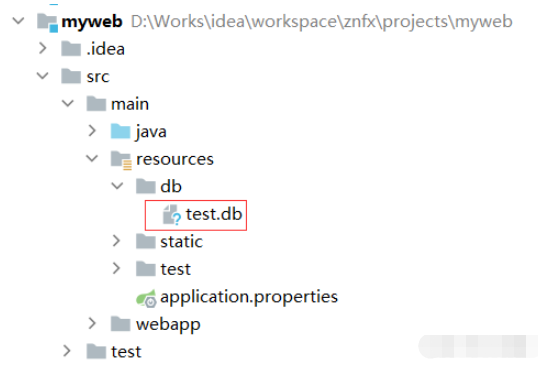
spring.datasource.url=jdbc:sqlite::resource:db/test.db
在如下位置,手动创建一个 test.db 空文件
3、测试代码
    @Autowired
    private JdbcTemplate jdbcTemplate;
        // 1、建表 DDL
        String createUser = "create table user(" +
                "id integer primary key autoincrement," +
                "name varchar(20)," +
                "age integer" +
                ")";
        jdbcTemplate.update(createUser);
        // 2、插入数据
        String insertUserData = "insert into user(name,age) values ('张三',18),('李四',20)";
        jdbcTemplate.update(insertUserData);
        // 3、查询语句
        String selectUserData = "select * from user";
        List> list = jdbcTemplate.queryForList(selectUserData);
        for (Map map : list) {
            for (Map.Entry entry : map.entrySet()) {
                System.out.println(entry.getKey() + "=" + entry.getValue());
            }
        }
        // 5、删除整张表
        String dropTable = "drop table user";
        jdbcTemplate.update(dropTable);
完整测试代码
package com.study.myweb;

import org.springframework.beans.factory.annotation.Autowired;
import org.springframework.boot.CommandLineRunner;
import org.springframework.boot.SpringApplication;
import org.springframework.boot.autoconfigure.SpringBootApplication;
import org.springframework.jdbc.core.JdbcTemplate;
import org.springframework.stereotype.Controller;

import java.util.List;
import java.util.Map;


@SpringBootApplication
public class MyWebApplication implements CommandLineRunner {

    @Autowired
    private JdbcTemplate jdbcTemplate;

    public static void main(String[] args) {
        SpringApplication.run(MyWebApplication.class, args);
    }

    @Override
    public void run(String... args) throws Exception {
        // 1、建表 DDL
        String createUser = "create table user(" +
                "id integer primary key autoincrement," +
                "name varchar(20)," +
                "age integer" +
                ")";
        jdbcTemplate.update(createUser);
        // 2、插入数据
        String insertUserData = "insert into user(name,age) values ('张三',18),('李四',20)";
        jdbcTemplate.update(insertUserData);
        // 3、查询语句
        String selectUserData = "select * from user";
        List> list = jdbcTemplate.queryForList(selectUserData);
        for (Map map : list) {
            for (Map.Entry entry : map.entrySet()) {
                System.out.println(entry.getKey() + "=" + entry.getValue());
            }
        }
        // 4、删除整张表
        String dropTable = "drop table user";
        jdbcTemplate.update(dropTable);
    }

}