java域对象共享数据如何实现
域对象共享数据
使用ServletAPI向request域对象共享数据
@RequestMapping("/testServletAPI")
public String testServletAPI(HttpServletRequest request) {
    request.setAttribute("key","value");
    return "index";
}
使用ModelView向request域对象中共享数据
@RequestMapping("/testModelAndView")
public ModelAndView testModelAndView(){
    ModelAndView mv = new ModelAndView();
    // 向请求域中共享数据
    mv.addObject("key","value");
    // 设置视图,实现跳转
    mv.setViewName("index");
    return mv;
}
使用Model向request域对象共享数据
@RequestMapping("/testModel")
public String testModel(Model model) {
    model.addAttribute("key","value");
    return "index";
}
使用map向request域对象共享数据
@RequestMapping("/testMap")
public String testMap(Map map) {
    map.put("key","value");
    return "index";
}
使用ModelMap向request域对象共享数据
@RequestMapping("/testModelMap")
public String testModelMap(ModelMap modelMap) {
    modelMap.addAttribute("key","value");
    return "index";
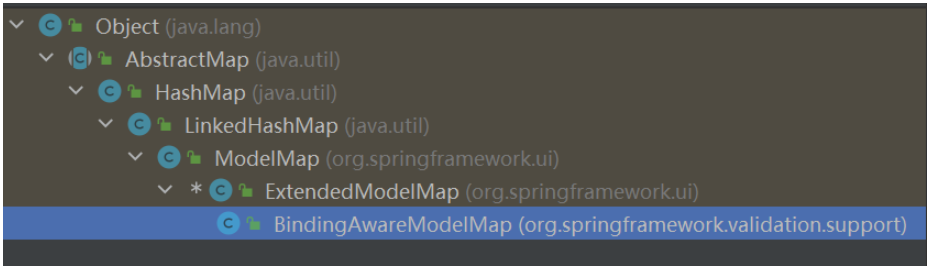
}ModelAndView、Model、Map、ModelMap传递数据时都是实例化org.springframework.validation.support.BindingAwareModelMap实现类
//DispatcherServlet源码,将数据封装的部分代码
// Actually invoke the handler.
mv = ha.handle(processedRequest, response, mappedHandler.getHandler());
向session域共享数据
@RequestMapping("/testSession")
public String testSession(HttpSession session){
    session.setAttribute("key","value");
    return "index";
}
向application域对象共享数据
@RequestMapping("testApplication")
public String testApplication(HttpSession session){
    ServletContext servletContext = session.getServletContext();
    servletContext.setAttribute("key","value");
    return "index";
}